Last weekend we hosted SekaiCTF 2026, the fifth edition of our CTF https://ctftime.org/ctf-wtf/
This year I was the only person who was in charge of the platform/infrastructure side of things, while also authored two challenges (which I am not going to be talking about here)
For all the previous years we were using a slightly outdated platform, slightly outdated infrastructure, slightly outdated everything. That’s why for this year I reworked everything from the ground up, and we even built a new platform along the way
Platform
Obviously, the first things players notice is our new beautiful platform, which is a rewritten version of rCTF with a new custom theme that a good friend of mine enscribe (and Devin) made
Backend
The backend was rewritten from scratch, to preserve compatibility we kept the v1 api layer and just added a v2 layer on top of it
The tech stack is:
- Typescript (Bun) with Hono
- Postgres / Redis for the databases
- Native kubernetes operator for the instancer (with a more lightweight docker alternative)
There is not much to talk about the platform honestly, it just.. works. And does so without consuming a ton of CPU/Memory like CTFd does
We were hosting the platform instance on a hetzner vps with the databases hosted in the same compose stack. Here is the cpu usage graph to give you an idea how lightweight everything is (keep in mind, SekaiCTF is a very popular CTF event)
For reference, for all the previous years we hosted, we were using CTFd with a custom theme. And during all previous years, except for 2025, we were experiencing one very annoying issue, which is the platform going down during the start of the CTF, because CTFd is horrible with the resource usage. It’s especially funny, because every year we were increasing the specs but it was never enough. In 2025, though, we overprovisioned to the absolute limits and it was the first year when we didn’t go down during the first minutes of the CTF (unfortunately the metrics were lost)
 LOCC
LOCC 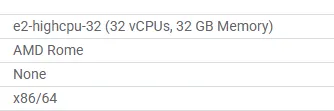 LOCC
LOCC  LOCC
LOCC we are back
 PJSK
PJSK HAHA
Infrastructure
Cloud
As usual, Google Cloud Platform was sponsoring our event by giving us $500 worth of credits.
The entirety of our cloud infrastructure was located in europe-west1St. Ghislain, Belgium
We were running everything in a brand new gcp project and a new billing account. This, unfortunately, resulted in me going through the GCP Sales chats back2back for a while until someone from the GCP CTF Sponsorship team helped me with getting our billing account trust increased
I am very thankful to them and here’s the email I sent them after the CTF when they reached out to ask how everything went:
Hey!
~ omitted text ~
Thank you for your help :)
I’ve never seen GCP quota default to 3000 N2 CPUs before,
Arsenii
Having a billing acount with a really good reputation is truly an experience of a lifetime
Networking
Anycast
This year, we started anycasting https://en.wikipedia.org/wiki/Anycast to reduce the latency for our Asian/American players
This, unfortunately, is not a magic thing that will get you a 20ms ping from Asia to the European server, but we probably will still keep anycast, the TCP/TLS handshake terminates on a nearby Google edge instead of doing every round-trip to Belgium, even the far-away players never actually complained
Here’s the full request round-trip (client all the way to our backend and back) by region.
Every challenge backend lives in europe-west1, so the latency mostly tracks the distance to Belgium:
| region | requests | p50 | p90 |
|---|---|---|---|
| Vietnam | 22,544,554 | 294 ms | 906 ms |
| South Korea | 8,837,224 | 265 ms | 302 ms |
| Germany | 8,557,475 | 12 ms | 14 ms |
| Algeria | 6,058,607 | 37 ms | 81 ms |
| Tunisia | 2,495,543 | 26 ms | 51 ms |
| Singapore | 916,664 | 360 ms | 587 ms |
| Russia | 903,542 | 47 ms | 173 ms |
| Canada | 836,714 | 120 ms | 748 ms |
| United States | 772,319 | 126 ms | 209 ms |
| India | 419,589 | 375 ms | 519 ms |
| Australia | 128,960 | 268 ms | 337 ms |
| Japan | 77,990 | 257 ms | 303 ms |
There were ~47M requests from China, but the geo/latency data is all over the place (courtesy of the Great Firewall), so I left it off the map rather than show a number I don’t believe
Routing
The thing is that while for HTTPs challenges we can just route based on the Host header, we unfortunately can’t do this for the TCP challenges because there’s nothing to match for
The usual solution for this (and what we used to be doing before, although without the global anycast ips) is to add the SSL terminating on the proxy and route based on the SNI https://en.wikipedia.org/wiki/Server_Name_Indication .
What I don’t like about this, is that as an outcome, instead of connecting via nc challenge.chals.sekai.team 1337, people need to do ncat --ssl challenge.sekai.team 1337.
It’s honestly a very minor thing and does not matter much in practice, but some of the new players are getting confused by this
The second solution is to just allocate random ports for the instances and have one single ip for this, but I want my instances to all be on the port 1337!
So the third solution, what we’ve done, is to just allocate one ip address per instance. This is not ideal, and also pricey, but at the same time we’re not the ones who are paying for the infra, so since we got free $500 from google, might as well spend everything in a single weekend
Kubernetes
Shared challenges cluster (+ some miscellaneous stuff)
The sekaictf-infra cluster consisted of two node pools:
- challenge pool: running 1 to 5
e2-standard-88 vCPU, 32GiB nodes per zone (challenges only) - infra pool: running 1 to 4
e2-standard-44 vCPU, 16GiB nodes per zone (kubernetes default workloads, our operator)
Our lovely custom kubernetes operator
For shared challenge instances I wrote my own kubernetes operator that was creating the workloads by itself from one simple CRCustom Resource to avoid any complex setups or manual configs per challenge:
apiVersion: sctf.es3n1n.io/v1alpha1
kind: Challenge
metadata:
  name: mikuprotect
  namespace: mikuprotect
spec:
  releaseTime: "2026-06-27T08:00:00Z"
  pods:
    - name: challenge
      replicas: 3
      automountServiceAccountToken: false
      egress: true # allow outbound internet access (default: false)
      spec:
        containers:
          - name: challenge
            image: "sekaictf-2026-challenges/mikuprotect:latest"
            env:
              - name: JAIL_ENV_FLAG
                value: "SEKAI{flag}"
            ports:
              - containerPort: 5000
            resources:
              requests: { cpu: 500m, memory: 512Mi }
              limits: { cpu: 1, memory: 1Gi }
            securityContext:
              privileged: true
    exposed:
      - protocol: TCP  # https/tcp
        subdomain: "{{ challenges[0].name | lower }}"
        port: 1337
        targetPort: 5000
        # adds the PROXY command for tcp endpoints (tcp only)
        proxyProtocol: true
        # do not terminate the connection on edge pops (no anycast)
        passthrough: false
The neat part is that this Challenge is the only thing a challenge author ever writes. The operator reconciles everything around it: one Deployment per pod, a Service for anything exposed, every network policy, the DNS records, and the cloud load balancers. Nobody touches kubernetes/cloud stuff directly
Deployments
By default:
- every pod is pinned to the
challengesnode pool via anodeSelectorand toleration, so challenge workloads never share a node with the operator, gateways or anything else important automountServiceAccountTokenis forced tofalse- DNS is swapped to
DNSNonewith8.8.8.8/8.8.4.4, so challenges can’t enumerate cluster-internal DNS - every container must declare cpu/memory
requestsandlimitsor the operator rejects the whole thing
Network policies
Every challenge starts with a deny-all network policy and only gets the exact rules it asks for:
linksopens pod-to-pod traffic inside a challengeegress: truelets a pod reach the public internet, but the private RFC1918 and metadata ranges are carved out, so a challenge can’t reach the cluster network or hit the GCP metadata serverexposedports are reachable only from the cloud load balancer’s source ranges, and only after releaseallowConnectTois a special case when the challenge needs to talk to another one across namespaces
So by default a challenge is a sealed box with no internet, no neighbors and no cluster access
Getting traffic in
The exposed block is where the cloud integration lives, and there are two protocols
HTTPS challenges get a
- One shared HTTPS LB, one shared cert (
*.chals.sekai.team) for all HTTPS endpoints - Gateway API
HTTPRouteattached to our shared GKE gateway with the challenge’s subdomain as the hostname - Google Cloud load balancer that the GKE’s gateway controller creates, plus a NEGNetwork Endpoint Group - the set of pod IPs a Google load balancer sends traffic to for it. The operator just adds an optional Cloud Armor
GCPBackendPolicyto allow only specific ips while testing pre-ctf
For each TCP port the operator assembles the entire GCP load-balancer chain itself:
- a global static IP
- forwarding rule
- target TCP proxy
- backend service
- the pod’s NEG
In case of a passthrough TCP challenge, the operator skips the managed proxy altogether and uses a plain, regional, LoadBalancer service with externalTrafficPolicy: Local to avoid terminating the connection at the loadbalancer and pass it directly to the challenge
In every case the operator creates an A record into Cloud DNS for {subdomain}.{base-domain} pointing at whichever IP was allocated, on a short TTL
Release scheduling
Every challenge goes live at the same instant, and to avoid cold-starting all of our load balancers the moment the CTF opens (because this takes up to 10 minutes), operator pre-provisions them. The lifecycle is split into two parts:
- at
releaseTimeminus a lead time (15 minutes by default) it builds everything (deployments, services, DNS, the full cloud LB chain, etc) - at
releaseTimeit flips the network policies open and players get in
As a result, the challenge become accessible in milliseconds past the release time
Adminbot
As part of the rCTF rewrite, we also rewrote the adminbot. The configs for the adminbots are now stored on the platform and are available to the players directly from the platform. In the future, when we publish the repo with the platform, we will also make an npm package that you can use for this adminbot to test things locally
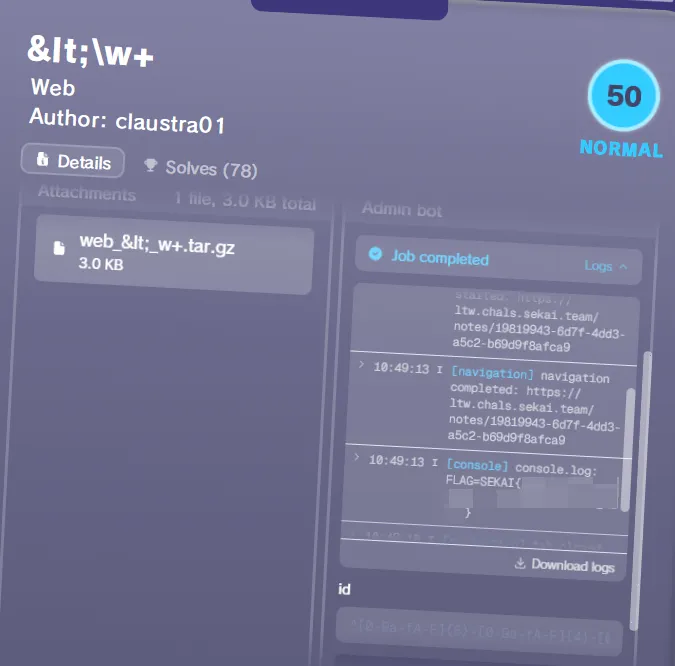
One of the fun things we’ve done is hooking of various browser events and store logs that the participants can then see to avoid posting everything to webhooks, etc
Here is an example config that the adminbot uses and that the players can download from the platform:
import { sleep } from 'bun'
import { Challenge, type ChallengeContext } from '../src/types'

const APP_URL = `https://ltw.chals.sekai.team`

export const challenge = new Challenge({
  timeoutMilliseconds: 30_000,

  inputs: {
    id: {
      pattern:
        '^[0-9a-fA-F]{8}-[0-9a-fA-F]{4}-[0-9a-fA-F]{4}-[0-9a-fA-F]{4}-[0-9a-fA-F]{12}$',
    },
  },

  handler: async (ctx: ChallengeContext): Promise<void> => {
    const url = `${APP_URL}/notes/${ctx.input.id!}`
    ctx.output.info('challenge', `visiting note`, { url })

    await ctx.browserContext.setCookie({
      name: 'FLAG',
      value: ctx.job.flag,
      domain: APP_HOST,
      path: '/',
    })

    const page = await ctx.browserContext.newPage()

    try {
      await page.goto(url)
    } catch (e) {
      ctx.output.fatal('challenge', `failed to visit provided URL: ${e}`, {
        url,
      })
      return
    }

    await sleep(5_000)
    await page.close()
  },

  hooksConfig: {
    showConsoleLogs: true,
    showBrowserErrors: true,
    showNavigation: true,
    showDialogs: true,
    autoDismissDialogs: true,
    limitTabsNumber: -1,
    limitTabsNumberShowError: true,
  },

  browser: 'chrome',

  restrictDomains: {
    host: {
      allowRegex: [{ pattern: '^ltw\.chals\.sekai\.team$' }],
      disallowRegex: [{ pattern: '.*' }],
    },
  },
})
When you submit the adminbot job, it queues it up on the platform side, and the adminbot workers drain this queue and dispatch the actual runs
On the cluster side it’s nothing fancy: one Deployment in its own namespace, sitting behind a plain L4 LoadBalancer on a dedicated static ip that the platform talks to over bearer auth.
The only interesting part is the scaling
I didn’t want to scale the workers on cpu, since cpu tells you nothing about how backed up the queue actually is. So the replica count is handed off to KEDA https://keda.sh . It polls the platform’s queue-depth endpoint every 10 seconds and scales to keep it around 2 jobs per worker. It’s still a plain HPA though, KEDA just feeds it the queue depth instead of cpu. There’s a min/max bound so it can’t run away, plus a 5 minute scale-down window
Ethereum challenges
For the ethereum challenge deployments we were running es3n1n/paradigmctf.py that spawns kubernetes workloads for every on-demand instance of the challenge for a team
The deployment is three things in a blockchain namespace: redis for instance state, an orchestrator, and an anvil proxy. When a team clicks deploy, the platform calls the orchestrator over its api, and it spins up a pod running anvil, funds the accounts, runs the challenge’s deploy script, and persist the state to redis
Those per-team anvil pods get the same default-deny treatment as everything else. They can’t reach each other, can’t hit the cloud metadata server or any private range, and only the orchestrator and api pods are allowed to talk to them
We had only 2 ethereum challenges and here’s how many of those anvil instances were alive throughout the CTF:
It’s a fork of paradigm’s CTF infra with a few fixes on top. Unfortunately, the code quality of this project and architecture designs are somewhat poor, so in the future I am planning on fully rewriting it from scratch instead of trying to fix it. Though, I must admit, it does work pretty reliably
Instancer cluster
The instancer-infra cluster consisted of two node pools:
- primary pool: running 2 to 32
n2-standard-88 vCPU, 32GiB nodes per zone - arm64 pool: running 1 to 8
c4a-standard-8AArch64, 8 vCPU, 32GiB nodes per zone
Over the whole weekend the instancer spawned around 6,400 instances:
One more custom kubernetes operator
For the instanced challenges we built a custom kubernetes operator that reconciles ChallengeInstance objects into workloads, traefik routing rules, network policies
apiVersion: rctf-instancer.osec.io/v1
kind: ChallengeInstance
metadata:
  labels:
    app.kubernetes.io/name: rctf-instancer
    app.kubernetes.io/managed-by: kustomize
  name: challengeinstance-sample
spec:
  teamId: teamId
  challengeId: challengeId
  expiresAt: '2026-12-19T20:30:00Z'
  pods:
    - name: app
      egress: true
      ports:
        - protocol: TCP
          port: 3000
      spec:
        restartPolicy: Always
        terminationGracePeriodSeconds: 0
        automountServiceAccountToken: false
        enableServiceLinks: false
        containers:
          - name: app
            image: 'sekaictf-2026-challenges/pokemon-park:latest'
            ports:
              - containerPort: 3000
            resources:
              requests: { cpu: 100m, memory: 128Mi }
              limits: { cpu: 500m, memory: 512Mi }
            readinessProbe:
              tcpSocket: { port: 3000 }
              initialDelaySeconds: 5
              periodSeconds: 3
            securityContext:
              allowPrivilegeEscalation: false
              capabilities:
                drop: ['ALL']
  expose:
    - kind: https
      hostPrefix: pokemon-park
      containerName: app
      containerPort: 3000
Resources it creates
Each ChallengeInstance gets its own namespace (inst-{challenge}-{team}), and everything for it lives inside: one Deployment per pod (always a single replica, these are disposable), a Service each, the traefik routes, and the same default-deny network policies as the shared cluster. Deleting the ChallengeInstance drops the namespace, and everything else cascades out with it, so teardown is just deleting one object
Isolation is the same idea as before. One team’s instance can’t see another team’s, can’t reach the cluster network, and only gets internet egress if the pod opts in with egress: true
Per-instance hostnames
Every exposed port gets its own hostname: {hostPrefix}-{12 hex}.instancer.sekai.team, where the hex comes from the instance’s UID
Everything under that is one wildcard too. A single *.instancer.sekai.team DNS record points at traefik’s load balancer covers every subdomain. Traefik routes http/https off the Host header, and for tcp it does the same SNI trick from the networking section
VMs and weird architectures
The arm64 pool was needed for the single pwn/MTE challenge, and the x86 nodes also have nested virtualization (/dev/kvm) wired up via squat/generic-device-plugin for the android challenge that exposes the adb connection to the players (misc/sekaiid)
CI/CD
Last year we had a law-and-order incident, where we didn’t notice that the challenge attachments on the platform were outdated, this happened because they were being synced manually.
This year I fixed this by implementing our own CI/CD action that both pushed data to the platform, and deployed/updated the instances
The way its designed is that challenge lives in one big monorepo, one folder per challenge, grouped by category.
Inside a folder you get the source, a solution, and a kona.yaml.
This one file contains everything: the metadata players see (name, author, description, difficulty), the flag, which files to hand out, the image to build, and how the thing actually gets deployed
A static challenge just inlines the Challenge CRD from earlier (templated) right there in its kona.yaml, and an instanced one inlines the ChallengeInstance config.
So whoever wrote the challenge also writes, in the same file, exactly how it runs. Here’s a trimmed example:
# pwn/3in1/kona.yaml (trimmed)
challenges:
  - category: pwn
    name: 3in1
    author: Qyn
    flags:
      rctf: { file: challenge/flag.txt } # real flag, read from the source
    attachments:
      files: ['challenge/'] # hand out the whole folder
      exclude: ['challenge/flag.txt'] # ...except the real flag
      additional:
        - { path: flag.txt, strContent: 'SEKAI{dummy_flag}' } # ship a fake one instead
    endpoints:
      - {
          type: nc,
          endpoint: "{{ challenge.name | lower }}.{{ config.domains['static'] }}",
          port: 1337,
        }

deployment:
  images:
    - {
        path: challenge,
        name: '{{ challenges[0].name | lower }}',
        registryName: challenges,
      }
  kubernetesInlineManifests:
    - clusterName: main
      documents: [... the Challenge CRD, templated ...]
The tool is open source at project-sekai-ctf/konata. It can talk to both rCTF and CTFd
After that, deploying is just git push. A github action runs on every push to main, works out which challenges actually changed, and creates concurrent actions to process them.
Each one authenticates to GCP with workload identity, builds the image, pushes it to artifact registry, applies the manifest, and syncs the metadata
So from a challenge author’s side the whole thing is: edit your folder, push, walk away. No kubectl, no logging into the platform
Minions in 16k
A very special in the infrastructure way challenge to deploy was game/Minions in 16k.
This was a KoTHKing of The Hill challenge where you had to write bots for a quake-like game to win against other players
This challenge had a fullblown matchmaking system with concurrent lobbies, ELO and everything else a “real” game has
Everything starts off with a platform integration (implemented as an instancer, they’re all modular and you can run multiple instancer providers with rCTF v2), where the people are clicking on a button to “launch” an instance
Here’s what happens after the press of this button
The lobbies
First thing that happens is rCTF backend converts your “create” instance request to the minions-backend specific shape, pulls out some config values for the deployments and sends this request to the minions-backend*. The minions-backend after that is adding you to the queue of people that are searching for the game
Once there’s more than N players of the same-ish elo looking for a game, it joins them into a game and starts the game
* - The minions backend was implemented entirely by @mixy1, the original author of this challenge
The games
The minions backend is then sending a request to our k8s instancer, that creates a workload in a shape like this:
pods:
  - name: app
    labels:
      ctf.sekai.team/minions: game-instance
      udprouter.es3n1n.io/instance-id: '000000000000000000000000'
    ports:
      - port: 1337
        protocol: UDP
    spec:
      containers:
        - name: app
          image: "{{ images['minions'] }}"
          args:
            - --bind
            - 0.0.0.0:1337
            - --replay-dir
            - /srv/minions/replays
            - --feature-flags
            - /srv/minions/config/feature_flags.toml
          resources:
            limits:
              cpu: 500m
              memory: 256Mi
            requests:
              cpu: 75m
              memory: 100Mi
      restartPolicy: Always
      terminationGracePeriodSeconds: 0
      automountServiceAccountToken: false
      enableServiceLinks: false
    egress: true
That yaml is only the base shape though. At spawn the backend injects the per-match bits into the server container: PLAYER_TOKENS, MATCH_ID, REPORT_URL/REPORT_TOKEN, a per-match WebTransport cert/key (WT_CERT_DER_B64/WT_KEY_DER_B64), and a REPLAY_UPLOAD_URL
Then, on the k8s instancer level I had to add one extra thing. For pods with a udprouter.es3n1n.io/instance-id label, allow ingress from the udp-router pod from the udp-router namespace
Routing
Now what is udprouter?
Minions in 16k is a real game with a real game networking implemented in UDP. We can’t really go with TCP for a game, and UDP does not have their own SNI so we can’t route people to their instances like that
So what I’ve done is, I implemented a tiny golang application that starts listening on :1337 with a SO_REUSEPORT sock over the GOMAXPROCS(0) workers
These workers are receiving 16 bytes of data (which is the instance id the platform generates), resolves this as a kubernetes pod from its udprouter.es3n1n.io/instance-id labels and forwards the rest of the traffic towards that pod’s :1337
Then I created one regional IP address and created a LoadBalancer pointing towards the udprouter deployment, and added a DNS entry on m.instancer.sekai.team that was pointing to that regional IP address
What the player actually gets handed isn’t a bare address either, but a full command line: client --remote <host:port> --instance-id <id> --key <key>. The --remote points at that regional LB, --instance-id is the 16-byte prefix the udprouter demuxes on, and --key is what authorizes them into their specific match
Finishing the games
Now after the game is over and the server exits, it uses a one-time token that the platform generates during its creation to authorize into the minions-backend api and upload the scores results, with a replay file
The backend is receiving this data, stores the scores, recomputes the elos and saves this replay to a custom bucket
Once the elos are recalculated, the platform sends the changed scores for specific teams to the rCTF backend, which then stores them as the team scores and wakes the leaderboard worker up
Here’s how this actually looked in production:
sequenceDiagram
  %% size: lg
  autonumber
  actor P as player
  participant API as rCTF api
  participant MM as minions-backend
  participant K8S as instancer
  participant POD as game pod
  participant EDGE as udp edge
  participant GCS as GCS bucket

  P->>API: click launch
  API->>MM: queue join (Bearer queueSecret)
  Note over MM: match N players by ELO
  MM->>K8S: create ChallengeInstance
  K8S->>POD: spawn + inject tokens / cert / report url
  MM-->>API: matched + endpoints
  API-->>P: connect cmd (client --remote … --key …)

  rect rgba(52, 168, 83, 0.12)
    P->>EDGE: QUIC over UDP · 16-byte id
    EDGE->>POD: demux + forward :1337
  end

  Note over P,POD: gameplay
  POD->>MM: signed report + replay (REPORT_TOKEN)
  MM->>GCS: store replay
  Note over MM: recompute ELO
  MM->>API: score webhook (RCTF_SECRET)
  API-->>P: leaderboard updated
So many lines of code!
By the numbers
A weekend of this throws off a lot of telemetry, and gcloud saves everything! So here’s the whole event as an itemized receipt:
To be clear, €465 was sort of the point. I had a pile of Google credits to burn, so I happily used the expensive-but-nice things: global anycast, a dedicated IP per TCP instance, and a comfortable amount of headroom everywhere. None of that is strictly necessary to run a CTF, a bare-bones version of all this would’ve cost a fraction of it
This price does not include Postmark/Hetzner bills, but that was cheap anyway